TimePicker
Hour + minute (+ optional seconds) selection. 12- or 24-hour mode.
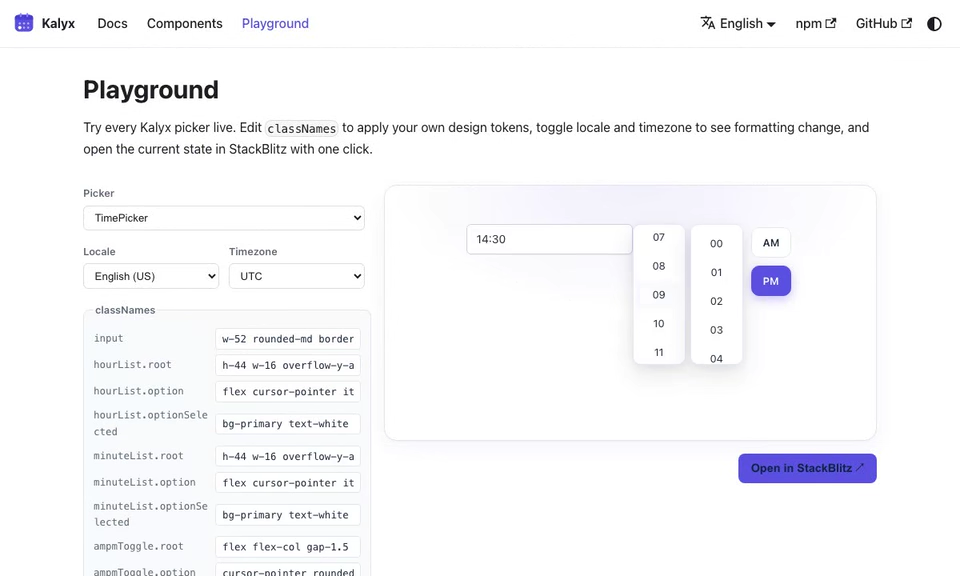
import { TimePicker } from '@kalyx/react';
Anatomy
<TimePicker>            {/* Root: holds the time value (ISO string) */}
  <TimePicker.Input /> {/* combobox <input>, parses "HH:mm" */}
  <TimePicker.Popover>  {/* optional role="dialog"; omit to render inline */}
    <TimePicker.HourList /> {/* role="listbox" of selectable hours */}
    <TimePicker.MinuteList /> {/* role="listbox" of selectable minutes */}
    <TimePicker.AmPmToggle /> {/* AM/PM switch (12-hour mode only) */}
  </TimePicker.Popover>
</TimePicker>
AmPmToggle is only meaningful when the Root runs in format="12h". HourList / MinuteList can be rendered inline or inside your own popover.
Basic usage
import { useState } from 'react';
import { TimePicker, type ISODateString } from '@kalyx/react';

function Example() {
  const [time, setTime] = useState<ISODateString | null>(null);
  return (
    <TimePicker value={time} onChange={setTime} format="24h" step={15}>
      <TimePicker.Input />
      <TimePicker.HourList />
      <TimePicker.MinuteList />
    </TimePicker>
  );
}
The value is still an ISO 8601 UTC string; the date part acts as a placeholder. Use getTime(iso) from @kalyx/core if you need just the hours/minutes.
Try it live
The live editor runs with
Reactand all Kalyx components in scope, soimportlines are omitted. Copy them in when porting to your project; see the full imports in the non-live blocks above.
function Basic24h() {
  const [time, setTime] = React.useState(null);
  return (
    <TimePicker value={time} onChange={setTime} format="24h" step={15}>
      <TimePicker.Input className="kx-live-input" style={{ minWidth: '8rem' }} />
      <div className="kx-live-row" style={{ marginTop: 8 }}>
        <TimePicker.HourList
          classNames={{
            root: 'kx-live-list',
            option: 'kx-live-option',
            optionSelected: 'kx-live-option-selected',
          }}
        />
        <TimePicker.MinuteList
          classNames={{
            root: 'kx-live-list',
            option: 'kx-live-option',
            optionSelected: 'kx-live-option-selected',
          }}
        />
      </div>
      <div className="kx-live-value" style={{ marginTop: 8 }}>
        Selected: <code>{time ?? 'null'}</code>
      </div>
    </TimePicker>
  );
}
<TimePicker> (Root)
| Prop | Type | Default | Description |
|---|---|---|---|
value | ISODateString | null | - | Controlled time. |
defaultValue | ISODateString | - | Uncontrolled initial value. |
onChange | (value: ISODateString | null) => void | - | Fires on any hour / minute / period change. |
format | '12h' | '24h' | '24h' | Time format. |
step | number | 1 | Minute granularity (e.g. 5, 15, 30). |
withSeconds | boolean | false | Show seconds in display + input. |
displayTimezone | string | - | IANA zone. When set, the hour/minute controls read and write time as observed in this zone (DST-aware). See Timezone. |
disabled | boolean | false | Disable the whole picker. |
readOnly | boolean | false | Prevent changes. |
filterTime | (hours: number, minutes: number) => boolean | - | Per-slot disable predicate. Return true to make a slot unselectable (same polarity as MUI X's shouldDisableTime; note this is the inverse of react-datepicker's filterTime, which returns true to keep a slot). An hour is disabled only when every step minute within it returns true. Always receives 24-hour values, regardless of format. |
locale | string | 'en-US' | BCP 47 locale used to localize the AM/PM labels (ko-KR renders 오전 / 오후). Does not change ARIA labels; use labels for those. |
onOpenChange | (isOpen: boolean) => void | - | Fires when TimePicker.Popover opens or closes. |
labels | Partial<TimePickerLabels> | - | Override ARIA labels. Keys: timeInput, hourList, minuteList, amPmToggle, hourOption(h), minuteOption(m). |
children | ReactNode | - | Sub-components. |
<TimePicker.Input>
A text input showing HH:MM (or HH:MM:SS when withSeconds). Parses on Enter / blur.
- Extends
<input>attributes exceptvalue,onChange,type. aria-labeldefaults to"Time"(override via the Root'slabels.timeInput).
<TimePicker.Popover>
Optional floating container, role="dialog". Omit it to render the lists inline.
TimePicker.Input opens it on click and on ArrowDown, and closes it on Escape.
Use the Root's onOpenChange to observe the transition.
| Prop | Type | Description |
|---|---|---|
classNames | TimePickerPopoverClassNames | Styling slots. |
<TimePicker.HourList>
A role="listbox" of available hours.
| Prop | Type | Description |
|---|---|---|
classNames | TimePickerHourListClassNames | Styling. |
type TimePickerHourListClassNames = {
  root?: string;         // <ul>
  option?: string;       // <li role="option">
  optionSelected?: string;
};
Hour set:
format="24h"→0-23format="12h"→1-12(AM/PM managed by<AmPmToggle>)
Each option emits data-selected when it is the current hour. MinuteList and AmPmToggle options emit the same data-selected flag. See Styling.
<TimePicker.MinuteList>
A role="listbox" of minutes, filtered by step.
| Prop | Type | Description |
|---|---|---|
classNames | TimePickerMinuteListClassNames | Styling (same shape as HourList). |
<TimePicker.AmPmToggle>
A role="radiogroup" with two role="radio" buttons. Only renders in format="12h".
| Prop | Type | Description |
|---|---|---|
classNames | TimePickerAmPmToggleClassNames | Styling. |
type TimePickerAmPmToggleClassNames = {
  root?: string;
  option?: string;
  optionSelected?: string;
};
Patterns
12-hour mode
<TimePicker value={time} onChange={setTime} format="12h" step={15}>
  <TimePicker.Input />
  <div className="flex gap-2">
    <TimePicker.HourList />
    <TimePicker.MinuteList />
    <TimePicker.AmPmToggle />
  </div>
</TimePicker>
function TwelveHour() {
  const [time, setTime] = React.useState(null);
  return (
    <TimePicker value={time} onChange={setTime} format="12h" step={15}>
      <TimePicker.Input className="kx-live-input" style={{ minWidth: '8rem' }} />
      <div className="kx-live-row" style={{ marginTop: 8 }}>
        <TimePicker.HourList
          classNames={{
            root: 'kx-live-list',
            option: 'kx-live-option',
            optionSelected: 'kx-live-option-selected',
          }}
        />
        <TimePicker.MinuteList
          classNames={{
            root: 'kx-live-list',
            option: 'kx-live-option',
            optionSelected: 'kx-live-option-selected',
          }}
        />
        <TimePicker.AmPmToggle
          classNames={{
            root: 'kx-live-ampm',
            option: 'kx-live-ampm-btn',
            optionSelected: 'kx-live-ampm-selected',
          }}
        />
      </div>
    </TimePicker>
  );
}
With seconds
<TimePicker value={time} onChange={setTime} withSeconds>
  <TimePicker.Input />
</TimePicker>
function WithSeconds() {
  const [time, setTime] = React.useState(null);
  return (
    <TimePicker value={time} onChange={setTime} withSeconds>
      <TimePicker.Input className="kx-live-input" style={{ minWidth: '8rem' }} />
      <div className="kx-live-value" style={{ marginTop: 8 }}>
        Selected: <code>{time ?? 'null'}</code>
      </div>
    </TimePicker>
  );
}
Extracting TimeValue for logic
import { TimePicker } from '@kalyx/react';
import { getTime } from '@kalyx/core';

function Example() {
  const [time, setTime] = useState<ISODateString | null>(null);

  useEffect(() => {
    if (!time) return;
    const { hours, minutes } = getTime(time); // { hours: 9, minutes: 30, seconds: 0 }
    console.log('time_set', { hours, minutes });
  }, [time]);

  return (
    <TimePicker value={time} onChange={setTime}>
      <TimePicker.Input />
    </TimePicker>
  );
}
Native form submission
Pass name to TimePicker.Input to submit the complete UTC-ISO value through a
hidden field; the visible HH:mm text is not submitted under that name.
<TimePicker defaultValue="2026-01-15T14:30:00.000Z">
  <TimePicker.Input name="appointmentTime" />
</TimePicker>